Sling TV is the first-ever App-based TV service for streaming on-demand programs and live TV shows over the internet. However, if Sling TV doesn’t satisfy you for any reason like the monthly cost for Sling TV Membership is slightly more expensive than other online streaming platforms if you have a low budget. So, you can easily cancel your Sling TV subscription within a few clicks.

A standard Netflix monthly subscription will cost you $13 per month, Disney+ will cost you $6.66 per month and Hulu costs $11.99 per month. Whereas, looking at the Sling TV prices that are between $30 to $45 per month. That becomes a quite obvious reason why someone wants to cancel his/her Sling TV Subscription.
If you have a regular membership or are on a free trial on Sling TV, you can easily cancel the Sling TV Subscription by following some basic steps. In this post, I have disclosed step by step procedure on:
- How to Cancel Sling TV Subscription.
- How to Cancel Your Sling TV Subscription over the Phone.
- How To Freeze Sling TV Subscription
- Plus, Sling TV alternatives.
How To Cancel Sling TV Subscription

If you’re looking for cheaper streaming services and wish to cancel your Sling TV account, then go ahead and follow these steps for account cancellation.
- First, go to Sling.com. Click on Sign in. Add your account details.
- As you are logged in to your account, in the top right-hand corner, click on the gear for settings. Go to “Manage Account”.
- Few options will pop up on the screen. You’ll find the option of “cancel subscription” there. Click on it.
- Sling TV App will attempt you to stay by flashing “learn more about Sling TV” on the screen. If you are not interested click on Cancel Subscription at the bottom.
- Now, you’ll be asked why you want to cancel your subscription? You can choose any reason you want.
- Next, you have to click on the “confirm the cancellation” option. And that’s it. You have successfully canceled your Sling TV Subscription.
How To Cancel Sling TV Membership Over Phone Call
It’s quite easy to cancel your Sling TV Subscription over a phone call. Just follow these basic steps and get your account canceled in no time.
- You simply need to reach out to any Sling TV agent and for that, you can give a call on 1-888-291-5217.
- An agent from the company will pick your call. Ask them if you want to cancel your Sling TV membership.
- Also, ask for a confirmation email from the agent.
- When they’ll close your account, you’ll get a confirmation email.
Can I Freeze My Sling TV Subscription Instead of Cancelling It?
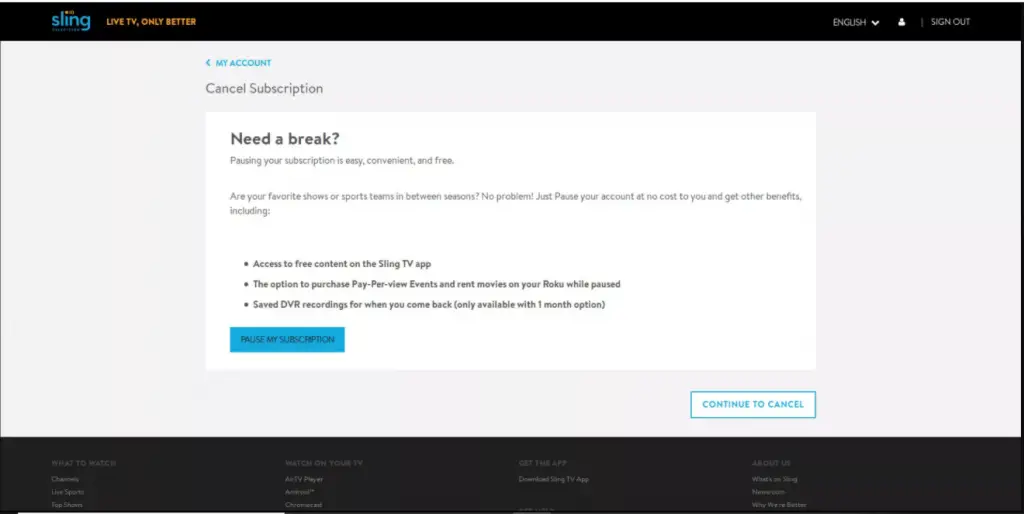
Sometimes you might need a break from online streaming or are busy with some work due to which you can’t actively use your subscribed account. It feels like a wastage. In case you want to re-activate your account sometime later then there is an option to pause your Sling TV Subscription that you can choose for the time being if you are busy or unavailable.
You can easily freeze or pause your Sling TV Subscription for some days. Follow these simple steps to execute this:
- For this, you need to go to your account settings.
- Click on Cancel Subscription.
- Now click on the “pause my subscription” option.
- Your subscription will be paused.
*Note: You can pause your Sling TV Subscription for up to 1-3 months.
Best Sling TV Alternatives
Everything has a replacement and so does your Sling TV. Here are the best ever Sling TV Alternatives that you can use for a better and cheaper streaming experience.
- Hulu
- Disney+
- Netflix
- YouTube
- Philo TV
- Fubo TV
- Crackle